Traditional code review tools are like a smoke detector that goes off every time you burn toast but stays silent during an actual fire.
They catch syntax errors, style violations, and missing semicolons. Meanwhile, the logical landmines that explode in production sail right through. The bugs that cost real money aren’t typos, they’re breaking changes that compile successfully but violate the contracts your codebase depends on.
Most AI code review systems suffer from the “everything problem.” They’re trained on millions of repositories to be helpful across every aspect of code quality. The result? They catch a little of everything but nothing with precision.
Tools like Recurse takes a different approach with specialized machine learning that changes the game entirely.
The Bug That Slips Through Every Review
Let’s start with a real example. Here’s a Python function handling user profile updates:
def update_user_profile(user_id, profile_data):
    user = get_user_by_id(user_id)

    # Validate required fields
    if 'email' in profile_data:
        validate_email(profile_data['email'])

    # Update profile
    for key, value in profile_data.items():
        setattr(user, key, value)

    user.save()
    return user
This looks fine. It validates emails, updates attributes, saves changes. A linter finds no issues. A human reviewer probably approves it.
The problem? Last week, someone improved get_user_by_id to return None for deleted users instead of raising an exception. Better error handling, right?
When user is None, the setattr calls fail. The bug only shows up for deleted users. In production, a subset of user experience random profile update failures.
Traditional reviewers miss this because they analyze functions in isolation. The code quality is fine, the bug is in the interaction between components.
Why General AI Code Review Fails
Most tools try to be everything to everyone. They suggest performance optimizations, architectural improvements, style changes, and security fixes all at once.
Take this JavaScript function:
function calculateOrderTotal(items, discountCode = null) {
    let subtotal = 0;

    items.forEach(item => {
        subtotal += item.price * item.quantity;
    });

    if (discountCode) {
        const discount = getDiscountAmount(discountCode, subtotal);
        subtotal = subtotal - discount;
    }

    const tax = subtotal * 0.08;
    return subtotal + tax;
}
A general reviewer like CodeRabbit suggests:
- Use
reduce()instead offorEach() - Add TypeScript types
- Extract tax rate to config
- Add JSDoc comments
- Consider discount lookup performance
All valid suggestions. But they miss the critical bug: getDiscountAmount can return more than the subtotal, creating negative order totals. The function needs bounds checking, but the system is distracted by style improvements.
Training Only on Bug Patterns
Specialized models take a different approach: train exclusively on patterns that lead to bugs. No style suggestions, no performance tips, no architectural advice, just laser-focused detection of code changes that break things.
The training data makes all the difference:
General Training:
- Code style preferences from millions of repos
- Performance optimizations and best practices
- Security patterns and architectural improvements
- Bug fixes mixed with general improvements
Specialized Training:
- Code changes that introduced production bugs
- Breaking changes and downstream effects
- API misuse patterns from real failures
- Logic errors that passed testing
- Integration issues between components
Here’s the difference in practice:
# Original payment function
def process_payment(user_id, amount, payment_method):
    user = User.objects.get(id=user_id)

    if user.account_balance >= amount:
        user.account_balance -= amount
        user.save()
        create_transaction_record(user_id, -amount, payment_method)
        return {"status": "success", "new_balance": user.account_balance}
    else:
        return {"status": "failed", "reason": "insufficient_funds"}

# Modified version
def process_payment(user_id, amount, payment_method):
    user = User.objects.get(id=user_id)

    # Added validation
    if not validate_payment_method(payment_method):
        return {"status": "failed", "reason": "invalid_payment_method"}

    if user.account_balance >= amount:
        user.account_balance -= amount
        user.save()
        create_transaction_record(user_id, -amount, payment_method)
        return {"status": "success", "new_balance": user.account_balance}
    else:
        return {"status": "failed", "reason": "insufficient_funds"}
General systems like CodeRabbit or Elipsis might praise the added validation. Specialized models flag the problem: you’ve created a third return state that breaks existing error handling.
Client code expects only “success” or “insufficient_funds” responses. The new “invalid_payment_method” state causes unexpected behavior downstream.
Three Types of Breaking Changes These Models Catch
Interface Changes That Break Dependencies
// Before
async function getUser(id: string): Promise<User> {
    const response = await api.get(`/users/${id}`);
    return response.data;
}

// After - "improved" with error handling
async function getUser(id: string): Promise<User | ApiError> {
    const response = await api.get(`/users/${id}`);
    if (response.status !== 200) {
        return { code: 'USER_NOT_FOUND', message: 'User not found' };
    }
    return response.data;
}
Better error handling, but it breaks every function that calls getUser expecting a User object. The specialized model flags this return type change because it’s learned that interface modifications frequently break downstream code.
Configuration Changes With Cascading Effects
# Innocent-looking config change
DATABASE_SETTINGS = {
    'default': {
        'ENGINE': 'django.db.backends.postgresql',
        'NAME': 'myapp',
        'USER': 'postgres',
        'PASSWORD': 'password',
        'HOST': 'localhost',
        'PORT': '5432',
        'OPTIONS': {
            'sslmode': 'require',  # New SSL requirement
        }
    }
}
Adding SSL improves security but breaks local development environments without SSL certificates. The model identifies this because it’s learned that configuration changes often cascade across deployment environments.
Logic Flow Changes That Break Assumptions
public ProcessResult processOrder(Order order) {
    // New early validation
    if (!order.hasValidItems()) {
        logOrderFailure(order, "Invalid items");
        return ProcessResult.failure("Invalid items in order");
    }

    validateCustomer(order.getCustomerId());
    calculatePricing(order);

    if (order.getTotal() > 0) {
        chargePayment(order);
        fulfillOrder(order);
        return ProcessResult.success();
    }

    return ProcessResult.failure("Invalid order total");
}
The new validation improves robustness but changes execution flow. Previously, all orders went through validateCustomer() and calculatePricing(). Analytics expects customer validation events. Pricing expects calculation calls. The early return breaks these dependencies.
The AI-Generated Code Problem
AI coding assistants create new challenges. They generate syntactically perfect code quickly but operate with limited context about your specific codebase.
# AI-generated user registration
def register_user(email, password, profile_data=None):
    # Validate email format
    if not re.match(r'^[^@]+@[^@]+\.[^@]+$', email):
        raise ValueError("Invalid email format")

    # Hash password
    password_hash = bcrypt.hashpw(password.encode('utf-8'), bcrypt.gensalt())

    # Create user
    user = User.objects.create(
        email=email,
        password_hash=password_hash,
        is_active=True,
        created_at=datetime.now()
    )

    # Add profile data
    if profile_data:
        for key, value in profile_data.items():
            setattr(user, key, value)
        user.save()

    return user
This looks professional and handles edge cases. But it violates several codebase-specific patterns implictly implemented that the AI couldn’t know about, for example:
- Email validation should use the centralized
EmailValidatorclass - New users start as
is_active=Falseuntil email verification - Profile data goes through model methods, not
setattr - User registration events must be logged for compliance
A code review agent trained on your specific patterns flags when generated code doesn’t align with established conventions. This is where Recurse’s specialized training makes the difference. It learns your project’s unique requirements instead of applying generic rules.
GitHub Integration: Catching Issues in Pull Requests
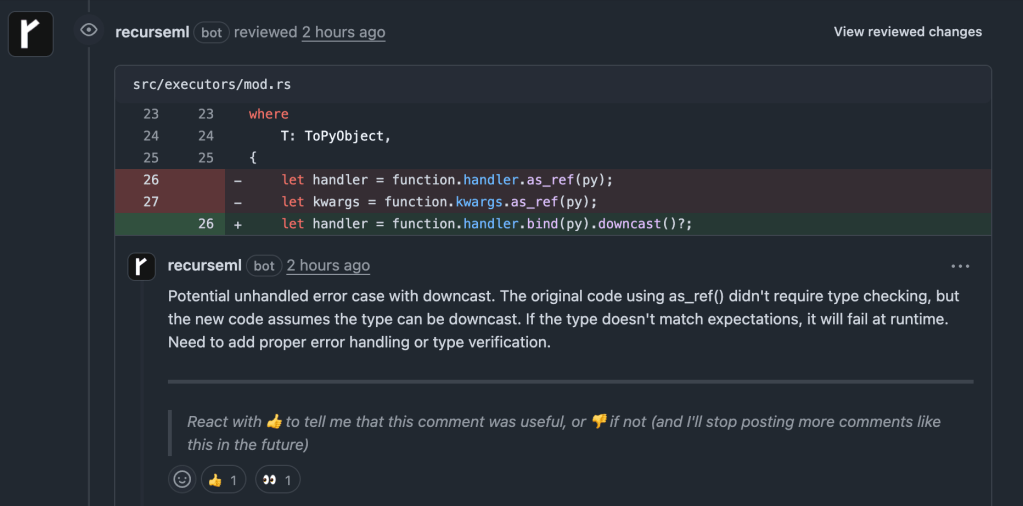
Unlike CodeRabbit and Elipsis (that flood PRs with dozens of suggestions), Recurse focuses only on changes that could break existing functionality.
Example output on a PR:
Terminal CLI: Local Prevention
But catching issues in pull requests is just one part of the story. The real power comes from catching problems even earlier in the development cycle.
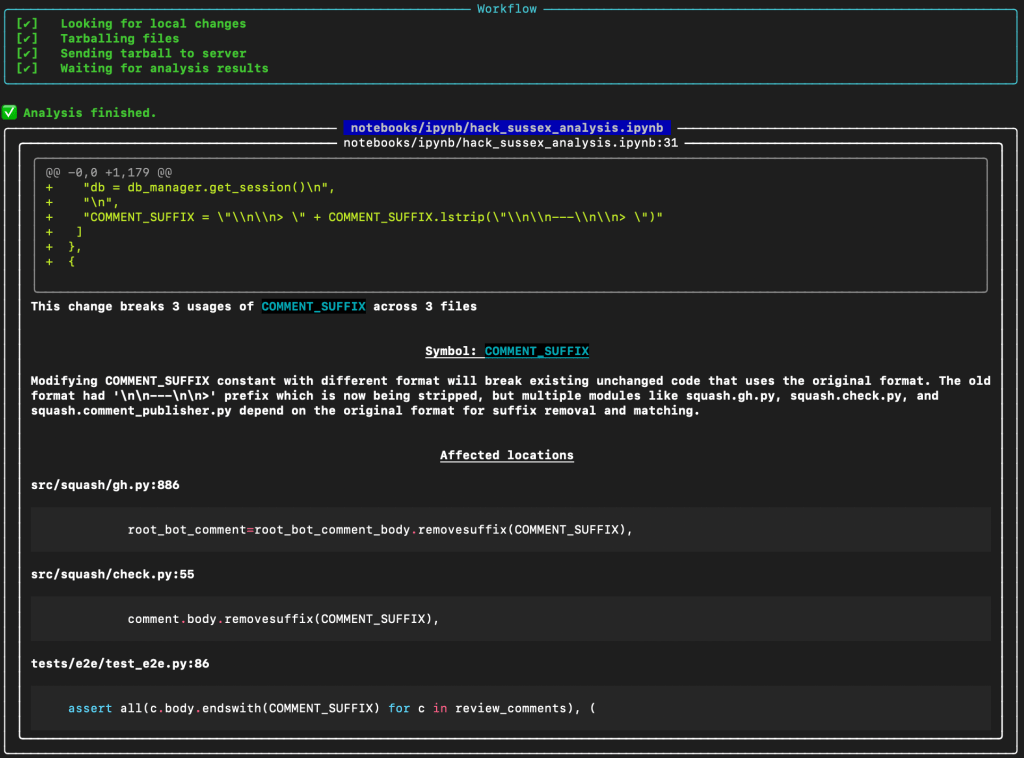
Having access to these models in the CLI enables validation during development, catching issues before they reach shared code. It’s like having a pair programming partner who never gets tired and knows every corner of your codebase.
Here’s an example of a bug I recently caught using Recurse’s CLI tool (rml):
AI Coding Integration (Cursor, GitHub Copilot, and Windsurf)
However, I found the most effective prevention works when using AI coding tools like Cursor, GitHub Copilot, and Windsurf. I can simply provide these tools with access to the CLI tool and have Recurse fix the code as it’s generated. I like to call this “vibecoding on steroids”.
Custom Rules: Teaching Your Codebase Patterns
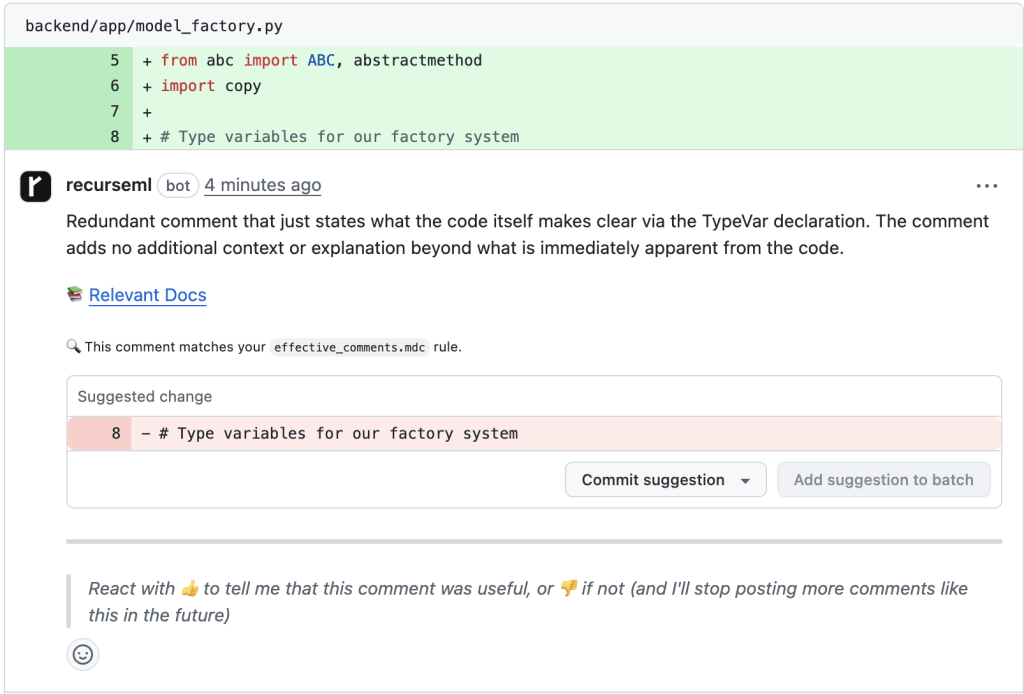
Every codebase develops unique conventions. The most effective detection combines general patterns with project-specific rules:
---
Name: effective-comments
Description: Explain WHY not WHAT the code does
Globs:
  - "**/*.js"
  - "**/*.ts"
  - "**/*.py"
  - "**/*.go"
  - "**/*.java"
  - "**/*.rb"
  - "**/*.cs"
---

# Effective Code Comments

Explain WHY not WHAT the code does. Document complex business logic, clarify non-obvious implementations, warn about gotchas, and provide context for maintainers. Use proper documentation comment format for functions/methods. Keep TODO comments specific with assignees. Update comments when code changes.

See: https://blog.codinghorror.com/code-tells-you-how-comments-tell-you-why/
The model learns to identify violations of your team’s specific patterns and enforces them over code:
The Bottom Line
General AI code review tools like CodeRabbit and Elipsis are like having a perfectionist editor who rewrites your prose but misses that you’ve accidentally written about the wrong topic entirely.
Specialized machine learning trained exclusively on bug patterns achieves surgical precision. It catches the breaking changes, interface modifications, and logic errors that cause expensive production incidents while ignoring the stylistic suggestions that distract from what actually matters.
The combination of GitHub integration for team review and CLI tools for individual validation creates a safety net that prevents bugs at every stage. With AI assistants generating more code faster than ever, specialized code analysis isn’t just useful, it’s essential for maintaining quality while leveraging AI productivity gains (combining Recurse’s CLI tool with Cursor is a must).
Teams using this approach report 70% fewer production incidents, faster development cycles, and greater confidence in deploying changes. The question isn’t whether specialized bug detection will become standard practice, but how quickly you can implement it to start preventing the issues that actually cost money.
Great code quality isn’t about catching every possible improvement. It’s about catching the changes that break things in production. Everything else is just noise.
 AI Coding Blog
Leave a comment