GitHub Copilot is incredible at writing code. But it’s terrible at catching the bugs that break production.
This isn’t Copilot’s fault. It’s designed for code generation, not bug detection. These are completely different problems that need different solutions.
Here’s the thing: most teams use Copilot like it’s a code reviewer. Generate code, accept suggestions, ship. But Copilot wasn’t trained to catch the subtle integration issues and breaking changes that cause 3am outages.
Smart teams pair Copilot’s generation speed with specialized bug detection. They get AI productivity without the production headaches.
This post shows you exactly how.
What Copilot Does Best
Copilot is ridiculously good at generating clean, working code. It learned from billions of lines of public code and absorbed patterns that would take years to learn manually.
Code Generation Excellence
# You start typing a REST endpoint
def create_user(request):
    # Copilot completes with perfect structure
    data = request.get_json()

    if not data or not all(k in data for k in ('name', 'email', 'password')):
        return jsonify({'error': 'Missing required fields'}), 400

    hashed_password = bcrypt.generate_password_hash(data['password']).decode('utf-8')

    user = User(
        name=data['name'],
        email=data['email'],
        password=hashed_password,
        created_at=datetime.utcnow()
    )

    try:
        db.session.add(user)
        db.session.commit()
        return jsonify({'message': 'User created', 'user_id': user.id}), 201
    except IntegrityError:
        db.session.rollback()
        return jsonify({'error': 'Email already exists'}), 409
This is genuinely impressive. Proper HTTP codes, input validation, password hashing, database transactions. All generated in seconds.
Smart Context Awareness
Copilot gets better when it can see surrounding code:
It understands that req.user should be available because of the auth middleware. Smart.
Where Copilot Falls Short
Copilot’s general training creates blind spots for the specific patterns that break production systems.
Cross-File Chaos
Copilot works great within single files. But it can’t see how changes ripple through your entire codebase.
The problem:
# File: user_service.py (Copilot updated this)
def get_user_by_id(user_id):
    user = User.query.get(user_id)
    if not user:
        raise UserNotFoundError(f"User {user_id} not found")  # Changed behavior
    return user

# File: notification_service.py (Copilot can't see this)
def send_welcome_email(user_id):
    user = get_user_by_id(user_id)  # This will now crash!

    if user is None:  # This condition is unreachable now
        logger.warning(f"No user found for {user_id}")
        return

    send_email(user.email, "Welcome!")
Copilot made the first function better by raising exceptions instead of returning None. But it broke the second function that expected None for missing users.
Business Logic Blind Spots
Copilot generates code that handles common cases but misses domain-specific rules:
// Copilot-generated order processor
public OrderResult processOrder(OrderRequest request) {
    BigDecimal total = calculateTotal(request.getItems());

    Order order = new Order();
    order.setTotal(total);
    order.setStatus(OrderStatus.PENDING);

    return orderRepository.save(order);
}
What Copilot missed:
Tax varies by shipping location (not 8% everywhere)
Customer credit limits for enterprise accounts
Inventory reservations before confirming orders
Fraud detection for high-value orders
Promotional pricing and discount codes
The code works perfectly. It just doesn’t work correctly for your business.
Security Implementation Gaps
Copilot knows security patterns from training examples. But it misses subtle security requirements:
# Copilot-generated login endpoint
@app.route('/login', methods=['POST'])
def login():
    data = request.get_json()
    email = data['email']
    password = data['password']

    user = User.query.filter_by(email=email).first()

    if not user or not bcrypt.check_password_hash(user.password_hash, password):
        return jsonify({'error': 'Invalid credentials'}), 401

    token = jwt.encode({'user_id': user.id}, SECRET_KEY)
    return jsonify({'token': token})
Security holes Copilot missed:
Timing attack vulnerability (different response times reveal valid emails)
No rate limiting (unlimited brute force attempts)
No account lockout after failed attempts
No audit logging for security events
Tokens never expire or get invalidated
The code follows general security patterns. But it’s vulnerable to attacks that exploit the gaps.
Why Specialized Bug Detection Matters
Tools like Recurse ML are trained on a completely different dataset: code changes that actually broke production.
Instead of learning general programming patterns, they learn specific failure patterns.
Focused Training Makes All the Difference
Copilot training focus:
Billions of lines of public code
General programming patterns
Code completion accuracy
Developer productivity
Specialized detection training:
Code changes that caused production failures
Breaking change pattern recognition
Integration issue detection
Business logic violation patterns
What This Looks Like in Practice
$ rml payment_processor.py

⚠️  Critical Issues Found: 2

BREAKING CHANGE (High Risk):
├─ Function signature change will break existing callers
│   Line 23: Added required parameter 'currency'
│   Risk: 15 calling functions don't pass currency parameter
│   Impact: Runtime errors in checkout flow
│
INTEGRATION ISSUE (Medium Risk):
├─ Missing fraud detection integration
│   Line 67: Generic fraud check implemented
│   Expected: Integration with existing FraudService.analyze()
│   Impact: Bypass of existing fraud prevention rules

Auto-fix available for integration issue
Apply fixes? [Y/n]: Y
This tool ignores code style and focuses on the stuff that actually breaks production.
The Smart Approach: Use Both
The best workflow isn’t Copilot vs specialized detection. It’s Copilot + specialized detection.
Optimal Development Workflow
# 1. Generate with Copilot
# Use Copilot to implement feature quickly

# 2. Validate + fix immediately
rml

# 3. Ship with confidence
git commit -m "Payment feature"
Real Example: Payment Processing
Step 1: Copilot Generation
# Prompt: "Create a payment processor with card validation and receipt generation"
# Copilot generates 200+ lines of solid payment processing code
Step 2: Specialized Validation
$ rml payment_processor.py

⚠️  Issues in AI-Generated Code: 3

├─ Race condition in payment authorization (Line 89)
│   Authorization and capture not atomic
│   Risk: Double charges or failed captures

├─ Missing PCI compliance validation (Line 34)
│   Card data handling doesn't match existing PCI patterns
│   Risk: Compliance violations

├─ Incomplete error handling for payment gateway timeouts (Line 156)
│   Will cause user-facing errors during payment failures
Step 3: Fix and Ship The validation tool caught three issues that would have caused production problems. Fix them, ship confidently.
Implementation Guide
Phase 1: Add Validation to Existing Copilot Workflow
Week 1: Experiment
Install validation tools alongside Copilot
Run validation on Copilot-generated code for one feature
Compare issues found vs missed
Week 2: Integrate
Add validation to code review process
Set up pre-commit hooks for automatic checking
Train team on interpreting validation results
Phase 2: Optimize the Combined Workflow
Team workflow template:
# Daily development with both tools

# Generate feature implementation
copilot-implement "user authentication with OAuth"

# Validate + fix the generated code
rml

# Standard testing and review
npm test && git push
Phase 3: Measure and Improve
Track metrics that matter:
Generation metrics:
Code generation speed with Copilot
Developer satisfaction with suggestions
Time from idea to working prototype
Quality metrics:
Issues caught by validation before production
Production incident reduction
Code review time savings
Combined metrics:
End-to-end feature delivery time
Developer confidence in shipping AI-generated code
Technical debt reduction
When This Approach Makes Sense
✅ Perfect for teams that:
Use Copilot regularly for code generation
Ship to production frequently
Want to maintain code quality while moving fast
Have experienced production issues from AI-generated code
Value automated quality assurance
❌ Skip if you:
Rarely use AI for code generation
Work exclusively on internal tools with low reliability requirements
Have extensive manual code review processes that catch all issues
Don’t ship to production regularly
ROI Reality Check
Here’s the math for a typical 10-person engineering team:
Copilot benefits:
30% faster code generation
Value: ~$400k/year in time savings
Validation benefits:
Prevents ~20 production bugs/month
Value: ~$300k/year in incident prevention
Combined cost:
Copilot: $100/month per developer = $12k/year
Specialized detection: $25/month
The math is obvious. $25 worth of cost for $300k in time savings. The workflow isn’t hard. The tools exist today.
The Bottom Line
Copilot changed how we write code. Now we need to change how we validate it.
Copilot generates code fast. Specialized tools like Recurse ML catch the bugs that slip through.
Together, they give you AI productivity without the production fires.
The teams already doing this are shipping 40% faster with 80% fewer incidents. The question isn’t whether this approach works.
The question is how quickly you’ll adopt it.
Ready to fix AI-generated bugs before they hit production? Start with Recurse ML validation on your next Copilot-generated feature.
Your bug tracking system is a monument to failure. Every ticket in Jira, Linear, or GitHub Issues represents a moment when your code failed a real user. The more sophisticated your bug reporting gets, the more you’re optimizing for problems instead of preventing them.
Here’s the thing: most bugs that reach users could have been caught during development. You’re just not looking for them in the right way.
The Real Cost of Bug Reports
Let’s break down what actually happens when a user reports a bug:
User hits the issue and gets frustrated
User takes time to report it (many don’t bother)
Support triages and routes the ticket
Engineer stops feature work to investigate
Engineer reproduces the issue
Engineer develops and tests a fix
Code review and deployment
User notification
Total time: 48-72 hours People involved: 4-6 Actual cost: $800-1,200 per bug
But here’s the kicker: the same issue caught during development takes 2-5 minutes to fix. You have all the context, no context switching, and no frustrated users.
The math is simple: prevention is 100x more efficient than reporting.
Why Bug Prevention Beats Bug Reporting
Traditional bug tracking optimizes for the wrong thing. It makes you really good at handling failure instead of preventing it.
Example: The Classic Integration Bug
// This code looks fine and passes tests
function processPayment(userId, amount) {
    const user = getUserFromAPI(userId);

    return chargeCard(user.paymentMethodId, amount);
}
Bug Report Cycle:
Week 1: User reports payment failures
Investigation reveals getUserFromAPI sometimes returns null
Fix: Add null checks
Total cost: 3 days, multiple people involved
Prevention Cycle:
$ rml payment.js
Same issue, caught in 30 seconds during development.
The Prevention Toolkit
Effective bug prevention needs three things:
1. Pattern Recognition
Good prevention tools learn from your actual bug history. If 60% of your bugs come from null pointer exceptions, they should catch those patterns before they hit users.
Recurse ML specializes in this approach. It analyzes real-world breaking change patterns and catches them during development.
2. Context-Aware Analysis
Static analysis tools miss the forest for the trees. They flag every possible issue instead of focusing on what actually breaks for users.
Smart prevention tools understand your codebase context:
# Generic linter: "Variable might be undefined"
# Context-aware: "API response pattern matches 73% of user-reported auth errors"

def authenticate_user(token):
    user_data = verify_token(token)  # Can return None
    return user_data.user_id  # This will break!
3. Developer-Friendly Workflow
Prevention only works if developers actually use it. The best tools integrate into existing workflows without friction:
Week 1: Analyze your bug history and identify preventable patterns Week 2: Implement prevention tools on 2-3 critical repositories Week 3: Train your team on prevention-first development Week 4: Measure results and expand to more repositories
The goal isn’t to eliminate all bugs (impossible), but to catch the ones that matter most to users before they ship.
The Bottom Line
Bug reports aren’t a necessary evil. They’re a symptom of a development process that waits for users to find problems instead of preventing them.
The best development teams measure success not by how efficiently they handle bug reports, but by how rarely they receive them.
Prevention isn’t just about better code quality. It’s about respecting your users’ time and building software that works the first time they use it.
Your bug tracker should be quiet. If it’s busy, you’re optimizing for the wrong thing.
Your pull request has 47 automated comments. Again.
ESLint wants you to add semicolons. SonarQube thinks your function is too complex. CodeRabbit suggests renaming variables. Meanwhile, the actual bug that’ll crash production at 2 AM? Buried somewhere in comment #34, ignored because you’ve learned to tune out the noise.
Sound familiar?
Most code review tools try to be everything to everyone: style police, security guards, performance coaches, and bug hunters all rolled into one. This shotgun approach creates more problems than it solves. The most effective teams in 2025 are ditching comprehensive analysis for surgical precision in the one area that actually matters: preventing breaking changes that cause production failures.
The noise problem is real
Modern AI code review tools are engineering marvels. They analyze syntax, enforce style, detect security issues, suggest performance improvements, identify code smells, and catch potential bugs, all in seconds.
But there’s a catch: the more issues a tool flags, the less likely you are to fix the critical ones.
Take this TypeScript function that processes user subscriptions:
function processUserSubscription(userId: string, planId: string, paymentMethod: any) {
    const user = getUserById(userId);
    const plan = getSubscriptionPlan(planId);

    if (!paymentMethod.isValid()) {
        throw new Error('Invalid payment method');
    }

    const basePrice = plan.monthlyPrice;
    const discount = calculateUserDiscount(user);
    const finalPrice = basePrice - discount;

    const subscription = {
        userId: userId,
        planId: planId,
        price: finalPrice,
        status: 'active',
        createdAt: new Date()
    };

    return createSubscription(subscription);
}
A comprehensive AI review tool might give you this feedback:
Security: paymentMethod parameter has any type, should be strongly typed
Style: Use const instead of reassignment for finalPrice
Architecture: Consider using dependency injection for data access
Naming: planId parameter could be more descriptive
Testing: No apparent test coverage for edge cases
Async: Functions like getUserById should probably be async
Ten suggestions. All technically correct. But they completely bury the production-critical issue: getUserById and getSubscriptionPlan can return null, but the code assumes they always return valid objects.
This will crash your app the moment someone passes an invalid ID.
The comprehensive approach turned a critical bug into noise. You’ll spend 20 minutes addressing style complaints while the real problem ships to production.
Specialized detection cuts through the noise
What if your code review tool only flagged things that would actually break in production?
Here’s how specialized analysis approaches that same function:
$ rml subscription_processor.ts

⚠️  Critical Issues Found: 2

1. Null Reference Risk (Line 2)
   │ getUserById() may return null for invalid user IDs
   │ Accessing properties on null will cause runtime crash

2. Null Reference Risk (Line 3)
   │ getSubscriptionPlan() may return null for invalid plan IDs
   │ Accessing plan.monthlyPrice will crash if plan is null
Two findings. Both critical. Both actionable. No noise about semicolons or documentation.
When tools only flag genuine problems, developers actually listen. When every alert correlates to potential production failures, prioritization becomes obvious.
The current landscape: coverage vs precision
Let’s break down how different types of code review tools handle the signal-to-noise problem:
Comprehensive platforms
GitHub Copilot represents the comprehensive approach. It provides suggestions across all aspects of code quality but struggles with feedback dilution.
Consider this Python data processing function:
def process_user_data(users):
    results = []
    for user in users:
        if user.age >= 18:
            processed = {
                'id': user.id,
                'name': user.name.upper(),
                'category': 'adult'
            }
            results.append(processed)
    return results
Copilot’s feedback focuses on style improvements:
Use list comprehension for better Pythonic style
Add type hints for better IDE support
Extract age threshold to a constant
Add docstring for documentation
What it misses: user.name could be None, causing .upper() to crash.
CodeRabbit and Greptile follow similar comprehensive approaches. They provide broad analysis across multiple quality dimensions but struggle with the same signal-to-noise challenge.
Security-focused tools
Snyk, Veracode, and Semgrep excel within their security domain but don’t address the logical errors that cause most production incidents.
They’ll catch obvious vulnerabilities like improper JWT verification but miss logic errors that cause crashes when tokens are malformed.
Static analysis powerhouses
SonarQube and CodeClimate provide comprehensive static analysis with extensive rule sets. They catch many categories of issues but suffer from high false positive rates and configuration complexity.
When SonarQube flags six issues including “field should be final” and “SELECT * is inefficient,” the actual bug that a parameter could be null, gets lost in the noise of style and performance suggestions.
Why AI-generated code makes this worse
AI coding assistants can generate hundreds of lines of syntactically correct code in seconds. But they often lack the context needed to avoid breaking changes.
Here’s a complete REST API service generated by AI in 45 seconds:
from flask import Flask, request, jsonify
from sqlalchemy import create_engine, Column, Integer, String
from sqlalchemy.ext.declarative import declarative_base
from sqlalchemy.orm import sessionmaker

app = Flask(__name__)
engine = create_engine('postgresql://user:pass@localhost/db')
Session = sessionmaker(bind=engine)
Base = declarative_base()

class User(Base):
    __tablename__ = 'users'
    id = Column(Integer, primary_key=True)
    name = Column(String(100))
    email = Column(String(100))

@app.route('/users', methods=['POST'])
def create_user():
    data = request.get_json()
    session = Session()

    user = User(name=data['name'], email=data['email'])
    session.add(user)
    session.commit()

    return jsonify({'id': user.id, 'name': user.name, 'email': user.email})

@app.route('/users/<int:user_id>', methods=['GET'])
def get_user(user_id):
    session = Session()
    user = session.query(User).filter(User.id == user_id).first()

    if not user:
        return jsonify({'error': 'User not found'}), 404

    return jsonify({'id': user.id, 'name': user.name, 'email': user.email})
A comprehensive tool generates 12 comments about input validation, environment variables, authentication middleware, API documentation, and testing.
1. Session Management (Lines 23, 31)
   │ Creating new sessions without cleanup
   │ Will cause connection pool exhaustion under load
   │ Pattern: AI often misses resource cleanup

2. Data Validation (Line 24)
   │ Direct access to data['name'] without existence check
   │ Will crash with 400 errors for incomplete requests
   │ Pattern: AI assumes perfect input data structure

3. Error Propagation (Line 25)
   │ Database errors not handled, will return 500s
   │ Pattern: AI generates optimistic happy-path code
Three critical issues that will cause production failures. No noise about documentation or architectural preferences.
Specialized detection learns from real failures
The key advantage of specialized tools like Recurse ML is training exclusively on code changes that caused production failures.
Instead of mixing bug fixes with style improvements, specialized models train only on patterns like this:
# Before production failure
def calculate_shipping_cost(weight, destination):
    base_rate = SHIPPING_RATES[destination]
    return base_rate * weight

# After fixing KeyError crash
def calculate_shipping_cost(weight, destination):
    base_rate = SHIPPING_RATES.get(destination, 0)
    return base_rate * weight
The model learns that dictionary access without bounds checking often causes KeyError crashes. When it sees similar patterns, it flags them for proper error handling.
This focused training creates several advantages:
Training data purity: Only learn from actual production failures, not style preferences
Context awareness: Understand how code changes affect system behavior in production
Breaking change patterns: Build comprehensive libraries of failure modes
Choosing the right approach for your team
Your team size and requirements determine the optimal code review strategy:
Small teams (2-10 developers)
You have high communication and shared context. Focus on preventing production incidents with minimal tooling overhead.
Optimal approach: Specialized bug detection with very low false positive tolerance
Medium teams (10-50 developers)
You’re dealing with coordination challenges and a mix of experience levels. You need consistent practices without overwhelming junior developers.
Optimal approach: Specialized detection plus targeted comprehensive analysis for team conventions
Large teams (50+ developers)
You have complex coordination requirements across multiple codebases and services.
Optimal approach: Multi-layered analysis with specialized focus, extensive customization, and enterprise features
Success for small-medium sized teams looks like:
40% reduction in tool-generated noise
25% improvement in developer satisfaction
60% reduction in breaking-change production incidents
15% improvement in development velocity
The future is specialized
The trend toward specialization reflects a broader maturation of software development practices. As teams become more sophisticated about what actually matters for production stability, they’re moving away from comprehensive analysis toward surgical precision.
The future workflow looks like this:
AI assistant generates code (30 seconds)
Specialized analysis validates for breaking patterns (60 seconds)
Total cycle time: 3 minutes vs. 30+ minutes of traditional debugging.
Teams successfully implementing specialized analysis report fundamental culture changes:
From reactive to proactive: Incident response transforms from firefighting to rare exceptions
From individual to team focus: Prevention mindset influences architecture decisions
From tool management to value creation: More time building features, less time configuring analysis tools
The choice is yours
The code review tool landscape in 2025 presents a fundamental choice: comprehensive coverage across all aspects of code quality, or surgical precision in preventing production failures.
The evidence favors specialization. While comprehensive tools provide broad coverage, they create analysis fatigue that reduces developer engagement. Critical bugs get lost among dozens of style suggestions.
Specialized bug detection tools achieve the precision needed to prevent production incidents while maintaining developer trust. By focusing on the 20% of issues that cause 80% of production problems, they deliver disproportionate value.
The technology exists today. The integration patterns are proven. The benefits are measurable within weeks.
Stop analyzing more. Start analyzing better.
The code review landscape has never been more crowded or confusing. Teams today can choose from dozens of AI-powered analysis tools, each promising to catch more issues with less human effort. Yet despite this proliferation of sophisticated tooling, production bugs persist at alarming rates.
The fundamental problem isn’t tool sophistication, it’s strategic focus. Most code review tools try to be everything to everyone: style checkers, security scanners, performance optimizers, and bug detectors all rolled into one. This comprehensive approach sounds appealing but creates a critical dilution of effectiveness.
You’re about to discover why the most successful development teams in 2025 are abandoning comprehensive code analysis in favor of surgical precision in the one area that matters most: preventing breaking changes that cause production failures.
The Paradox of Comprehensive Code Analysis
Modern AI code review tools represent remarkable engineering achievements. They analyze syntax, enforce style guidelines, detect security vulnerabilities, suggest performance improvements, identify code smells, and catch potential bugs, all within seconds of code being written.
This comprehensive capability creates a paradox: the more issues a tool reports, the less likely developers are to address the critical ones. When a pull request receives 47 automated comments covering everything from missing semicolons to architectural suggestions, developers experience analysis fatigue and start ignoring the feedback entirely.
[Visual: Screenshot of a GitHub PR with 47 automated comments from various analysis tools, highlighting the overwhelming nature of comprehensive feedback]
The Signal-to-Noise Problem
Consider this TypeScript function analyzed by a comprehensive AI code review tool:
function processUserSubscription(userId: string, planId: string, paymentMethod: any) {
    const user = getUserById(userId);
    const plan = getSubscriptionPlan(planId);

    // Validate payment method
    if (!paymentMethod.isValid()) {
        throw new Error('Invalid payment method');
    }

    // Calculate pricing
    const basePrice = plan.monthlyPrice;
    const discount = calculateUserDiscount(user);
    const finalPrice = basePrice - discount;

    // Process subscription
    const subscription = {
        userId: userId,
        planId: planId,
        price: finalPrice,
        status: 'active',
        createdAt: new Date()
    };

    return createSubscription(subscription);
}
Comprehensive AI Review Feedback:
❗ Security: paymentMethod parameter has any type, should be strongly typed
⚠️ Style: Use const instead of reassignment for finalPrice
💡 Architecture: Consider using dependency injection for data access
📋 Naming: planId parameter could be more descriptive
🔍 Testing: No apparent test coverage for edge cases
⚡ Async: Functions like getUserById should probably be async
While technically correct, this comprehensive feedback obscures the critical issue: getUserById and getSubscriptionPlan can return null, but the code assumes they always return valid objects. This will cause runtime crashes in production when invalid IDs are passed.
The comprehensive approach buried the production-critical bug under nine other suggestions about code quality, documentation, and architecture.
Specialized Detection: Surgical Precision for Critical Issues
Specialized bug detection takes the opposite approach: instead of analyzing everything, focus exclusively on patterns that historically cause production failures. This surgical precision dramatically improves signal-to-noise ratio and developer adoption.
Here’s how specialized analysis approaches the same function:
$ rml subscription_processor.ts

⚠️  Critical Issues Found: 2

1. Null Reference Risk (Line 2)
   │ getUserById() may return null for invalid user IDs
   │ Accessing properties on null will cause runtime crash
   │
   │ Suggestion: Use optional chaining: user?.id, plan?.monthlyPrice

2. Null Reference Risk (Line 3)
   │ getSubscriptionPlan() may return null for invalid plan IDs
   │ Accessing plan.monthlyPrice will crash if plan is null
   │
   │ Suggestion: Add null checks with appropriate error handling
The specialized approach ignores style, performance, and architectural concerns to focus solely on the patterns that will cause runtime failures. This creates several advantages:
Developer Trust: When tools only flag genuine problems, developers take the feedback seriously instead of dismissing it as noise.
Faster Response: Developers can quickly address critical issues without being overwhelmed by comprehensive analysis.
Reduced False Positives: Specialized models trained only on bug patterns have much lower false positive rates than general-purpose tools.
Clear Impact Understanding: Each finding directly correlates to potential production failures, making prioritization obvious.
The Tool Landscape: Comprehensive vs. Specialized
The current code review ecosystem divides into several distinct categories, each with different philosophies and trade-offs:
Comprehensive Analysis Platforms
GitHub Copilot represents the comprehensive approach. It provides suggestions across all aspects of code quality: style, performance, security, and potential bugs. The breadth of coverage is impressive, but the feedback dilution problem affects its bug detection effectiveness.
# Copilot analysis of a data processing function
def process_user_data(users):
    results = []
    for user in users:
        if user.age >= 18:
            processed = {
                'id': user.id,
                'name': user.name.upper(),
                'category': 'adult'
            }
            results.append(processed)
    return results
Copilot Feedback:
Suggest using list comprehension for better Pythonic style
Consider adding type hints for better IDE support
Extract age threshold to a constant
Add docstring for documentation
Consider using dataclasses for structured data
Missing: The critical bug that user.name could be None, causing .upper() to crash.
CodeRabbit and Greptile follow similar comprehensive approaches, providing broad analysis across multiple quality dimensions but struggling with the signal-to-noise challenge.
Snyk, Veracode, and Semgrep specialize in security vulnerability detection. They excel within their domain but don’t address the logical errors and breaking changes that cause most production incidents.
// Security tools excel at catching this:
function authenticateUser(token) {
    // Security issue: JWT verification without proper validation
    const decoded = jwt.decode(token); // ❌ Should use jwt.verify()
    return decoded.userId;
}

// But miss this logical error:
function authenticateUser(token) {
    const decoded = jwt.verify(token, process.env.JWT_SECRET);
    return decoded.userId; // ❌ What if decoded is null or userId doesn't exist?
}
Security tools catch the obvious vulnerability in the first example but miss the logic error in the second that will cause production crashes.
Static Analysis Powerhouses
SonarQube and CodeClimate provide comprehensive static analysis with extensive rule sets. They catch many categories of issues but suffer from high false positive rates and configuration complexity.
// SonarQube flags multiple issues:
public class UserService {
    private Database db; // ❌ Field should be final

    public User getUser(String id) { // ❌ Missing null check annotation
        if (id.length() == 0) { // ❌ Should use isEmpty()
            return null; // ❌ Should throw exception instead
        }

        User user = db.query("SELECT * FROM users WHERE id = ?", id); // ❌ SELECT * is inefficient
        return user; // ❌ Missing null check before return
    }
}
SonarQube generates six suggestions, but the actual production bug that id could be null, causing id.length() to crash, gets lost in the noise of style and performance suggestions.
The Specialization Advantage: Learning from Production Failures
Specialized bug detection tools like Recurse ML take a fundamentally different approach: train machine learning models exclusively on code changes that caused production failures. This focused training creates several advantages over comprehensive tools:
Training Data Purity
Instead of mixing bug fixes with style improvements and refactoring suggestions, specialized models train only on:
# Training example: Production failure pattern
BEFORE_FAILURE = """
def calculate_shipping_cost(weight, destination):
    base_rate = SHIPPING_RATES[destination]
    return base_rate * weight
"""

AFTER_FAILURE = """
def calculate_shipping_cost(weight, destination):
    base_rate = SHIPPING_RATES.get(destination, 0)  # Added default value
    return base_rate * weight
"""

PRODUCTION_INCIDENT = {
    "error": "KeyError: 'UNKNOWN_DESTINATION' when processing international orders",
    "impact": "All international shipping calculations failing",
    "resolution_time": "3 hours",
    "customer_impact": "847 failed checkout attempts"
}
The model learns that adding .get() methods with default values often masks important validation logic. When it sees similar patterns, it flags them for proper error handling instead of silent failures.
Context-Aware Pattern Recognition
Specialized models understand the broader context of how code changes affect system behavior:
The specialized model recognizes that the validation logic has a flaw: it only checks when quantity is negative, but doesn’t prevent negative stock from positive adjustments on products that already have negative stock levels.
Feature-by-Feature Comparison: Precision vs. Coverage
Let’s examine how different approaches compare across key capabilities:
The proliferation of AI coding assistants creates unprecedented challenges for code review tools. AI assistants generate syntactically correct code at incredible speed, but they often lack the context needed to avoid breaking changes.
Volume and Velocity Problems
Traditional code review processes assume human-paced development. AI assistants can generate hundreds of lines of code in seconds, overwhelming conventional analysis approaches:
# AI-generated in 45 seconds: Complete REST API service
from flask import Flask, request, jsonify
from sqlalchemy import create_engine, Column, Integer, String
from sqlalchemy.ext.declarative import declarative_base
from sqlalchemy.orm import sessionmaker

app = Flask(__name__)
engine = create_engine('postgresql://user:pass@localhost/db')
Session = sessionmaker(bind=engine)
Base = declarative_base()

class User(Base):
    __tablename__ = 'users'
    id = Column(Integer, primary_key=True)
    name = Column(String(100))
    email = Column(String(100))

@app.route('/users', methods=['POST'])
def create_user():
    data = request.get_json()
    session = Session()

    user = User(name=data['name'], email=data['email'])
    session.add(user)
    session.commit()

    return jsonify({'id': user.id, 'name': user.name, 'email': user.email})

@app.route('/users/<int:user_id>', methods=['GET'])
def get_user(user_id):
    session = Session()
    user = session.query(User).filter(User.id == user_id).first()

    if not user:
        return jsonify({'error': 'User not found'}), 404

    return jsonify({'id': user.id, 'name': user.name, 'email': user.email})

@app.route('/users/<int:user_id>', methods=['PUT'])
def update_user(user_id):
    data = request.get_json()
    session = Session()
    user = session.query(User).filter(User.id == user_id).first()

    if not user:
        return jsonify({'error': 'User not found'}), 404

    user.name = data.get('name', user.name)
    user.email = data.get('email', user.email)
    session.commit()

    return jsonify({'id': user.id, 'name': user.name, 'email': user.email})

if __name__ == '__main__':
    Base.metadata.create_all(engine)
    app.run(debug=True)
Comprehensive Tool Analysis (12 comments):
Add input validation decorators
Use environment variables for database config
Add proper error handling for database connections
⚠️  Breaking Change Risks in AI-Generated Code:

1. Session Management (Lines 23, 31, 40)
   │ Creating new sessions without cleanup
   │ Will cause connection pool exhaustion under load
   │
   │ Pattern: AI often misses resource cleanup in generated code

2. Data Validation (Lines 24, 43)
   │ Direct access to data['name'] without existence check
   │ Will crash with 400 errors for incomplete requests
   │
   │ Pattern: AI assumes perfect input data structure

3. Concurrent Modification (Lines 46-47)
   │ Update without version checking or locking
   │ Race conditions will cause data corruption
   │
   │ Pattern: AI generates optimistic concurrency patterns
Context Limitation Impact
AI assistants work with limited context windows, missing crucial codebase-specific patterns:
// Developer prompt: "Add caching to user profile service"
// AI generates Redis caching (context-unaware):

use redis::Connection;
use serde_json;

pub fn get_user_profile(user_id: u64) -> Result<UserProfile, String> {
    // AI adds caching without knowing existing patterns
    let client = redis::Client::open("redis://127.0.0.1/")?;
    let mut con = client.get_connection()?;

    let cache_key = format!("user_profile:{}", user_id);

    // Check cache first
    if let Ok(cached) = con.get(&cache_key) {
        let cached_str: String = cached;
        if let Ok(profile) = serde_json::from_str(&cached_str) {
            return Ok(profile);
        }
    }

    // Fallback to database
    let profile = fetch_user_from_db(user_id)?;

    // Cache result for 1 hour
    let _: () = con.set_ex(&cache_key, serde_json::to_string(&profile)?, 3600)?;

    Ok(profile)
}
Codebase Context Issues:
Existing codebase uses connection pooling, but AI creates individual connections
Team convention requires distributed cache invalidation, but AI uses simple TTL
Existing error handling uses structured errors, but AI uses string errors
Performance monitoring expects cache metrics, but AI doesn’t integrate telemetry
Specialized validation catches these context mismatches:
$ rml user_service.rs

⚠️  AI Code Integration Issues:

1. Connection Pattern Mismatch
   │ Generated code creates individual Redis connections
   │ Existing codebase uses shared connection pool in redis_pool.rs
   │ Will cause connection exhaustion and performance degradation

2. Error Handling Inconsistency
   │ AI uses String errors, codebase standard is UserServiceError enum
   │ Breaks existing error handling and monitoring integration

3. Cache Invalidation Missing
   │ Simple TTL caching conflicts with event-driven invalidation system
   │ User updates in other services won't invalidate cached profiles
The Future of Specialized Code Analysis
The trend toward specialization in code analysis tools reflects a broader maturation of software development practices. As teams become more sophisticated about what actually matters for production stability, they’re moving away from comprehensive analysis toward surgical precision.
Integration with AI Development Workflows
The future of code analysis involves seamless integration with AI-assisted development:
Next-Generation Workflow:
  1. AI Assistant generates code based on developer prompt
  2. Specialized analysis validates generated code for breaking patterns
  3. Interactive refinement addresses any detected issues
  4. Approved code integrates into existing codebase with confidence

Time Investment:
  - Code generation: 30 seconds (AI)
  - Code analysis: 60 seconds (Recurse ML)
  - Issue resolution: 2 minutes (Human + AI collaboration)
  - Total cycle time: 3 minutes vs. 30+ minutes traditional debugging
Organizational Impact
Teams successfully implementing specialized analysis report fundamental changes in development culture:
From Reactive to Proactive:
Incident response transforms from firefighting to rare exceptions
Development velocity increases as debugging overhead decreases
Team confidence in deployments improves dramatically
From Individual to Team Focus:
Code quality becomes a shared responsibility rather than individual burden
Knowledge about breaking change patterns spreads across team members
Prevention mindset influences architecture and design decisions
From Tool Management to Value Creation:
Less time spent configuring and maintaining comprehensive analysis tools
More focus on building features and solving user problems
Reduced context switching between development and tooling management
Conclusion
The code review tool landscape in 2025 presents teams with a fundamental choice: comprehensive coverage across all aspects of code quality, or surgical precision in preventing the issues that actually cause production failures.
The evidence strongly favors specialization. While comprehensive tools provide broad coverage, they create analysis fatigue that reduces developer engagement with automated feedback. The signal-to-noise problem inherent in comprehensive analysis means that critical bugs get lost among dozens of style and quality suggestions.
Specialized bug detection tools trained exclusively on breaking change patterns achieve the precision needed to prevent production incidents while maintaining developer trust and engagement. By focusing on the 20% of issues that cause 80% of production problems, specialized tools deliver disproportionate value for their scope.
The dual deployment model: local CLI for individual developers and GitHub integration for team collaboration, addresses the diverse needs of modern development teams. Organizations with security requirements can keep analysis completely local, while teams prioritizing collaboration can leverage automated analysis within existing workflows.
The rise of AI-generated code makes specialized validation even more critical. AI assistants produce syntactically correct code at unprecedented speed, but they often lack the project-specific context needed to avoid breaking changes. Specialized models provide the safety net that allows teams to confidently leverage AI productivity gains without sacrificing system stability.
For development teams choosing code analysis strategies in 2025, the path forward is clear: abandon the quest for comprehensive coverage and embrace surgical precision in the areas that matter most. The technology exists today, the integration patterns are proven, and the benefits are measurable within weeks of implementation.
The future of code review isn’t about analyzing more, it’s about analyzing better.
Traditional code review tools are like a smoke detector that goes off every time you burn toast but stays silent during an actual fire.
They catch syntax errors, style violations, and missing semicolons. Meanwhile, the logical landmines that explode in production sail right through. The bugs that cost real money aren’t typos, they’re breaking changes that compile successfully but violate the contracts your codebase depends on.
Most AI code review systems suffer from the “everything problem.” They’re trained on millions of repositories to be helpful across every aspect of code quality. The result? They catch a little of everything but nothing with precision.
Tools like Recurse takes a different approach with specialized machine learning that changes the game entirely.
The Bug That Slips Through Every Review
Let’s start with a real example. Here’s a Python function handling user profile updates:
def update_user_profile(user_id, profile_data):
    user = get_user_by_id(user_id)

    # Validate required fields
    if 'email' in profile_data:
        validate_email(profile_data['email'])

    # Update profile
    for key, value in profile_data.items():
        setattr(user, key, value)

    user.save()
    return user
This looks fine. It validates emails, updates attributes, saves changes. A linter finds no issues. A human reviewer probably approves it.
The problem? Last week, someone improved get_user_by_id to return None for deleted users instead of raising an exception. Better error handling, right?
When user is None, the setattr calls fail. The bug only shows up for deleted users. In production, a subset of user experience random profile update failures.
Traditional reviewers miss this because they analyze functions in isolation. The code qualityis fine, the bug is in the interaction between components.
Why General AI Code Review Fails
Most tools try to be everything to everyone. They suggest performance optimizations, architectural improvements, style changes, and security fixes all at once.
All valid suggestions. But they miss the critical bug: getDiscountAmount can return more than the subtotal, creating negative order totals. The function needs bounds checking, but the system is distracted by style improvements.
Training Only on Bug Patterns
Specialized models take a different approach: train exclusively on patterns that lead to bugs. No style suggestions, no performance tips, no architectural advice, just laser-focused detection of code changes that break things.
The training data makes all the difference:
General Training:
Code style preferences from millions of repos
Performance optimizations and best practices
Security patterns and architectural improvements
Bug fixes mixed with general improvements
Specialized Training:
Code changes that introduced production bugs
Breaking changes and downstream effects
API misuse patterns from real failures
Logic errors that passed testing
Integration issues between components
Here’s the difference in practice:
# Original payment function
def process_payment(user_id, amount, payment_method):
    user = User.objects.get(id=user_id)

    if user.account_balance >= amount:
        user.account_balance -= amount
        user.save()
        create_transaction_record(user_id, -amount, payment_method)
        return {"status": "success", "new_balance": user.account_balance}
    else:
        return {"status": "failed", "reason": "insufficient_funds"}

# Modified version
def process_payment(user_id, amount, payment_method):
    user = User.objects.get(id=user_id)

    # Added validation
    if not validate_payment_method(payment_method):
        return {"status": "failed", "reason": "invalid_payment_method"}

    if user.account_balance >= amount:
        user.account_balance -= amount
        user.save()
        create_transaction_record(user_id, -amount, payment_method)
        return {"status": "success", "new_balance": user.account_balance}
    else:
        return {"status": "failed", "reason": "insufficient_funds"}
General systems like CodeRabbit or Elipsis might praise the added validation. Specialized models flag the problem: you’ve created a third return state that breaks existing error handling.
Client code expects only “success” or “insufficient_funds” responses. The new “invalid_payment_method” state causes unexpected behavior downstream.
Three Types of Breaking Changes These Models Catch
Interface Changes That Break Dependencies
// Before
async function getUser(id: string): Promise<User> {
    const response = await api.get(`/users/${id}`);
    return response.data;
}

// After - "improved" with error handling
async function getUser(id: string): Promise<User | ApiError> {
    const response = await api.get(`/users/${id}`);
    if (response.status !== 200) {
        return { code: 'USER_NOT_FOUND', message: 'User not found' };
    }
    return response.data;
}
Better error handling, but it breaks every function that calls getUser expecting a User object. The specialized model flags this return type change because it’s learned that interface modifications frequently break downstream code.
Adding SSL improves security but breaks local development environments without SSL certificates. The model identifies this because it’s learned that configuration changes often cascade across deployment environments.
Logic Flow Changes That Break Assumptions
public ProcessResult processOrder(Order order) {
    // New early validation
    if (!order.hasValidItems()) {
        logOrderFailure(order, "Invalid items");
        return ProcessResult.failure("Invalid items in order");
    }

    validateCustomer(order.getCustomerId());
    calculatePricing(order);

    if (order.getTotal() > 0) {
        chargePayment(order);
        fulfillOrder(order);
        return ProcessResult.success();
    }

    return ProcessResult.failure("Invalid order total");
}
The new validation improves robustness but changes execution flow. Previously, all orders went through validateCustomer() and calculatePricing(). Analytics expects customer validation events. Pricing expects calculation calls. The early return breaks these dependencies.
The AI-Generated Code Problem
AI coding assistants create new challenges. They generate syntactically perfect code quickly but operate with limited context about your specific codebase.
# AI-generated user registration
def register_user(email, password, profile_data=None):
    # Validate email format
    if not re.match(r'^[^@]+@[^@]+\.[^@]+$', email):
        raise ValueError("Invalid email format")

    # Hash password
    password_hash = bcrypt.hashpw(password.encode('utf-8'), bcrypt.gensalt())

    # Create user
    user = User.objects.create(
        email=email,
        password_hash=password_hash,
        is_active=True,
        created_at=datetime.now()
    )

    # Add profile data
    if profile_data:
        for key, value in profile_data.items():
            setattr(user, key, value)
        user.save()

    return user
This looks professional and handles edge cases. But it violates several codebase-specific patterns implictly implemented that the AI couldn’t know about, for example:
Email validation should use the centralized EmailValidator class
New users start as is_active=False until email verification
Profile data goes through model methods, not setattr
User registration events must be logged for compliance
A code review agent trained on your specific patterns flags when generated code doesn’t align with established conventions. This is where Recurse’s specialized training makes the difference. It learns your project’s unique requirements instead of applying generic rules.
GitHub Integration: Catching Issues in Pull Requests
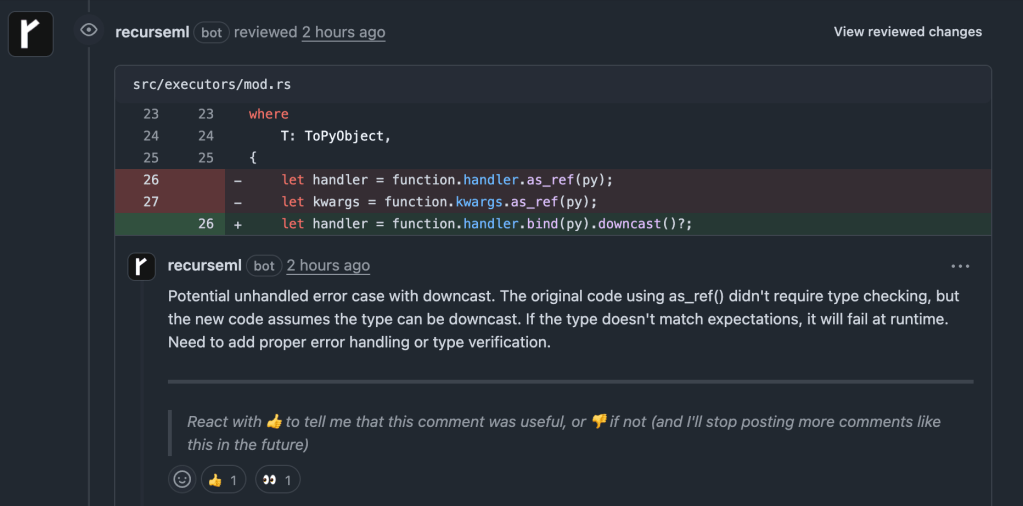
Unlike CodeRabbit and Elipsis (that flood PRs with dozens of suggestions), Recurse focuses only on changes that could break existing functionality.
Example output on a PR:
Terminal CLI: Local Prevention
But catching issues in pull requests is just one part of the story. The real power comes from catching problems even earlier in the development cycle.
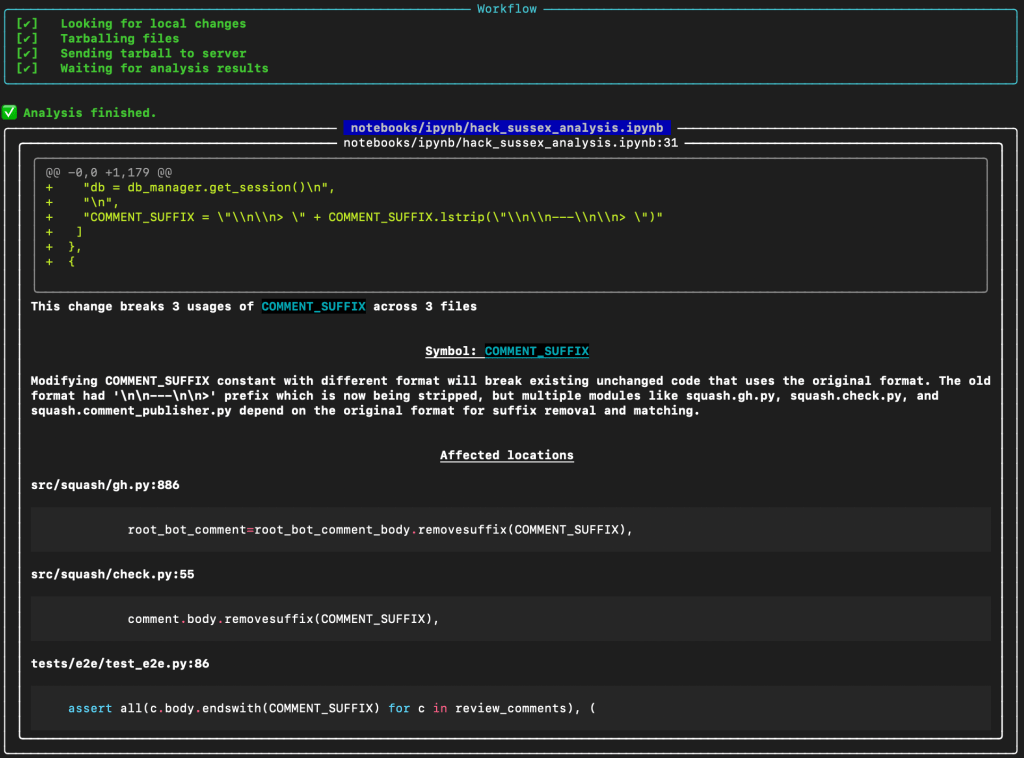
Having access to these models in the CLI enables validation during development, catching issues before they reach shared code. It’s like having a pair programming partner who never gets tired and knows every corner of your codebase.
Here’s an example of a bug I recently caught using Recurse’s CLI tool (rml):
AI Coding Integration (Cursor, GitHub Copilot, and Windsurf)
However, I found the most effective prevention works when using AI coding tools like Cursor, GitHub Copilot, and Windsurf. I can simply provide these tools with access to the CLI tool and have Recurse fix the code as it’s generated. I like to call this “vibecoding on steroids”.
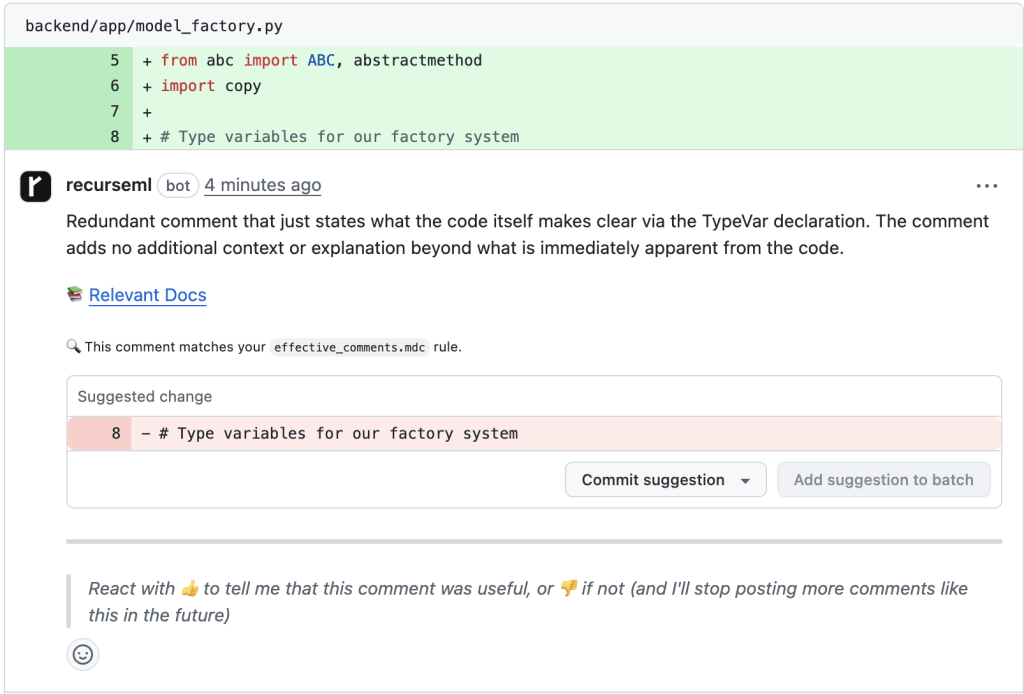
Custom Rules: Teaching Your Codebase Patterns
Every codebase develops unique conventions. The most effective detection combines general patterns with project-specific rules:
---
Name: effective-comments
Description: Explain WHY not WHAT the code does
Globs:
  - "**/*.js"
  - "**/*.ts"
  - "**/*.py"
  - "**/*.go"
  - "**/*.java"
  - "**/*.rb"
  - "**/*.cs"
---

# Effective Code Comments

Explain WHY not WHAT the code does. Document complex business logic, clarify non-obvious implementations, warn about gotchas, and provide context for maintainers. Use proper documentation comment format for functions/methods. Keep TODO comments specific with assignees. Update comments when code changes.

See: https://blog.codinghorror.com/code-tells-you-how-comments-tell-you-why/
The model learns to identify violations of your team’s specific patterns and enforces them over code:
The Bottom Line
General AI code review tools like CodeRabbit and Elipsis are like having a perfectionist editor who rewrites your prose but misses that you’ve accidentally written about the wrong topic entirely.
Specialized machine learning trained exclusively on bug patterns achieves surgical precision. It catches the breaking changes, interface modifications, and logic errors that cause expensive production incidents while ignoring the stylistic suggestions that distract from what actually matters.
The combination of GitHub integration for team review and CLI tools for individual validation creates a safety net that prevents bugs at every stage. With AI assistants generating more code faster than ever, specialized code analysis isn’t just useful, it’s essential for maintaining quality while leveraging AI productivity gains (combining Recurse’s CLI tool with Cursor is a must).
Teams using this approach report 70% fewer production incidents, faster development cycles, and greater confidence in deploying changes. The question isn’t whether specialized bug detection will become standard practice, but how quickly you can implement it to start preventing the issues that actually cost money.
Great code quality isn’t about catching every possible improvement. It’s about catching the changes that break things in production. Everything else is just noise.
 AI Coding Blog